This plugin provides a new model to display a magnifier on an image for localised zoom : <imgXX|zoom>.
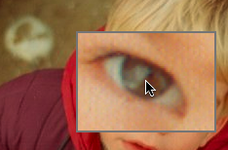
The configuration page allows to choose a different style for the magnifier window or specify your own personal style. See the end of this article for styling options.
The code is based on the TJPZoom library by Jànos Tòth.
The plugin will only work with templates using the #INSERT_HEAD tag.
If you use SPIP 1.9.2, you need to download the javascript library from TJPZoom and put its content in a directory tjpzoom in the squelettes directory. If you use SPIP 2, this is done automatically.
Using the Magnifier
The magnifier is activated as soon as the mouse enters the thumbnails. If the original image is very large, a « loading... » message will appear while it loads.
By click and dragging up and down on the image, you can change the magnification level of the zoom.
By click and dragging left/right, you can change the size of the zoom window.
Model Option
The <imgXX|zoom> model can be aligned left and right with <imgXX|zoom|right> et <imgXX|zoom|left>. However, unlike the default img model, this does not float the text around the image.
The maximum width of the thumbnail can be specified globally from the configuration page or locally with the parameter : <imgXX|size=340>
Personalised Magnifier Style
The configuration of the style can be done through a javascript file named tjpzoom_config_XXXX.js and placed in the directory squelettes.
The file defines the following variables :
| variable | use |
|---|---|
var TJPzoomwidth=160; |
width of the zoom window. |
var TJPzoomheight=120; |
height of the zoom window. |
var TJPzoomwindowlock=0; |
if this variable is equal to 1, the window size is fixed. |
var TJPzoomoffsetx=.5; |
horizontal offset of the zoom window to the mouse pointer. 0.5 puts the pointer in the center of the zoom window. |
var TJPzoomoffsety=.5; |
vertical offset of the zoom window to the mouse pointer. 0.5 puts the pointer in the center of the zoom window. |
var TJPzoomamount=4; |
initial zoom level. |
var TJPzoomamountmax=12; |
maximum zoom level. |
var TJPzoomamountmin=1; |
minimum zoom level. |
var TJPborderthick=2; |
width of the zoom border. |
var TJPbordercolor='#cccccc'; |
colour of the border. |
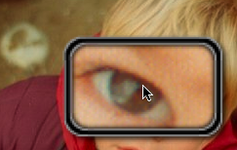
In addition to these parameters, you can specify an image for the the border of the zoom window. To personalise this border, you have to create a directory
XXXX in the squelettes folder with eight png images for the border and corners :
n.png, ne.png, e.png, se.png, s.png, sw.png, w.png, nw.png.
You also have to add the configuration variable var TJPshadowthick=8; to specify the half width of the border.
Aucune discussion
Ajouter un commentaire
Avant de faire part d’un problème sur un plugin X, merci de lire ce qui suit :
Merci d’avance pour les personnes qui vous aideront !
Par ailleurs, n’oubliez pas que les contributeurs et contributrices ont une vie en dehors de SPIP.
Suivre les commentaires : |
|
