SPIP-Contrib

SPIP-Contrib

عربي | Deutsch | English | Español | français | italiano

273 Plugins, 191 contribs On SPIP-Zone, 43 visitors now

Homepage > Admin and maintenance solutions > Import-Export > Bouton mémo > The ’Snapshot button’

The ’Snapshot button’

14 June 2007 (Date first published: 8 June 2007). – by Fil, Pierre Lazuly

All the versions of this article: [English] [français]

1 vote

The Snapshot button is the little web photocopier, which offers you to insert in your SPIP site, copies of web pages of your interest.

Installation

Upload file memo.php on your spip site’s root directory.

Configuration

You will be asked to define in which section you wish to publish your snapshots articles, and which user status is required to use this button, ... that done, type ’Yes’ in ’Activation’ field.

How to use it

Drag and drop the link in your browser’s bookmarks list. Then visit any webpage : clicking on the bookmark displays a pop-up dialogue box asking you to confirm the title of the page. After validating, the page is then ’photocopied’ in your own site.

If you complete the title, adding between brackets the name of your source, it will then be automatically added into the field ’nom_site’ (site name) of the photocopied page. [1]...

Some screenshots

-  1. - Here is a page I want to copy

-  2. - Click !
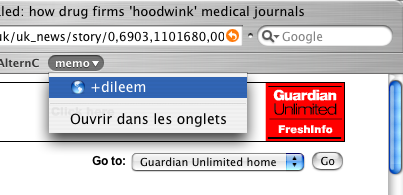
-  3. - A dialog box appears displaying the page’s title
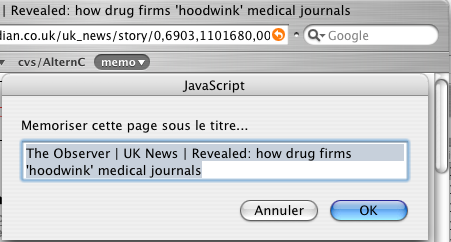
-  4. - let’s adjust a little bit...
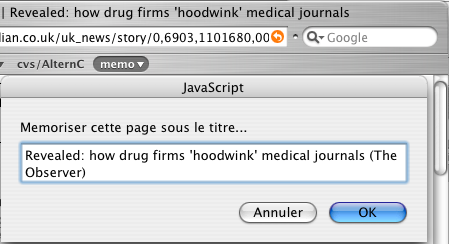
-  5. - That’s it !
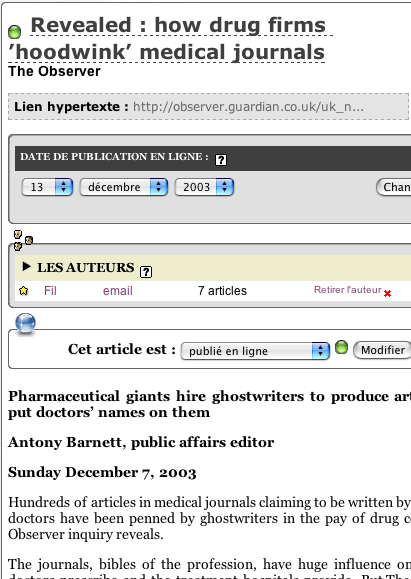
Question: Is this really legal ?

Answer : By copying webpages and pasting them on your own webpages for publishing purpose with no regard for copyrights, you commit a breach of the law. The same holds true for this ’Snapshot button’. It is up to you to make a proper use of it and abide by the law.

Download

-  for Spip 1.9.1

Zip - 4.3 kb
Le bouton mémo
Version du 12 juillet 2006 : compatible SPIP 1.9.1

-  for older versions from 1.7 to 1.8.3

Zip - 4.2 kb
Version antique
Version du 17 mars 2005. Compatible SPIP 1.8.2 et 1.8.3

Snapshot button will only work with Spip from version 1.7.

P.S.

Originally coded and published by Fil & Pierre Lazuly.
Translated from French by Etienne B. aka L.Oiseau2nuit
Thanks to Jacky Bondoux for the corrections he brought to this translation. Feel free to send feedbacks ;)

Footnotes

[1On the screenshot, this is an older version which inserted the name of the source in the subtitle field.

Back to top

Comment on this article

Who are you?
  • [Log in]

To show your avatar with your message, register it first on gravatar.com (free et painless) and don't forget to indicate your Email addresse here.

Enter your comment here Les choses à faire avant de poser une question (Prolégomènes aux rapports de bugs. )
Add a document

Back to top

Here they're talking

  • (fr) Une licence pour un article

    18 avril 2007 – 25 <blink style='color:red;'>public|spip|ecrire:commentaires</blink>

    Sur une idée originale de erational, voici un plugin permettant de lier une licence à un article.

  • (fr) Plugin Parrainage

    6 novembre 2011 – <blink style='color:red;'>public|spip|ecrire:commentaire</blink>

    Permettre aux utilisateurs d’inviter leurs contacts à s’inscrire sur le site. Description Vous connaissez le web moderne et son cortège d’applis toujours en version « beta » et de buzz sur le dernier réseau à la mode ? Vous voulez vous aussi vous y (...)

  • (fr) Formulaire de contact libre

    27 avril 2011 – 36 <blink style='color:red;'>public|spip|ecrire:commentaires</blink>

    Dans SPIP il n’y a pas un formulaire de contact, mais autant de formulaires de contact que d’auteurs. Cette phrase de Romy, dans son article Une page de contact dans mon SPIP, pointe un petit manque de SPIP. La possibilité d’insérer rapidement un (...)

  • (fr) Plugin Mot de Passe Compliqué

    2 novembre 2007 – 16 <blink style='color:red;'>public|spip|ecrire:commentaires</blink>

    Ce plugin ajoute un testeur de complexité de mot de passes dans les formulaires de choix de mot de passe de SPIP.

  • (fr) Navigation AJAX

    31 janvier – 18 <blink style='color:red;'>public|spip|ecrire:commentaires</blink>

    Ce plugin permet de modifier automatiquement une parties des liens internes de manière à ce qu’ils ne déclenchent pas un chargement complet de la page cible, mais un chargement en AJAX de certains éléments spécifiés à l’avance. Il permet aussi de (...)